Portsea Guest Guide.

WiFi
Network Name
Portseahome
Password
18273645
Troubleshooting
WiFi works but no internet?
The NBN connection box is under the downstairs living room TV. Check the lights are on – if not, unplug for 30 seconds then plug back in.

No WiFi at all?
This may be a power issue with the network hub in the garage. Please do not touch – contact your rental agent.
WiFi works in some areas but not others?
A WiFi access point may have failed. Contact your rental agent.
Alarm
Alarm keypads are located in the garage and near the front door. Your 4-digit PIN will be provided by your rental agent.

Disarm: PIN → DISARM
Tip: Press any button to wake the keypad – it will beep once. Arm when you’re out to keep valuables safe.
Monitoring: Not back-to-base monitored. Phone alerts available on request – contact your rental agent.
Front Gate Intercom
Your 4-digit PIN will be provided by your rental agent.
From the Gate Keypad
Open Garage: # → PIN → 2 → #
From Inside the House
Use the Gate and Cams app on the iPad in the kitchen.
When someone presses the doorbell at the gate, the tablet will ring. Press the green phone icon to answer.
Gate: Lock 1
Garage: Lock 2
CCTV
The property has security cameras covering the gate and exterior areas. Use the Gate and Cams app on the iPad in the kitchen to view live camera feeds.
Privacy: Playback of recordings is disabled to protect previous guest privacy.
Turning Off the Inside Camera
If you’d like privacy, you can turn off the inside camera using the remote power switch.
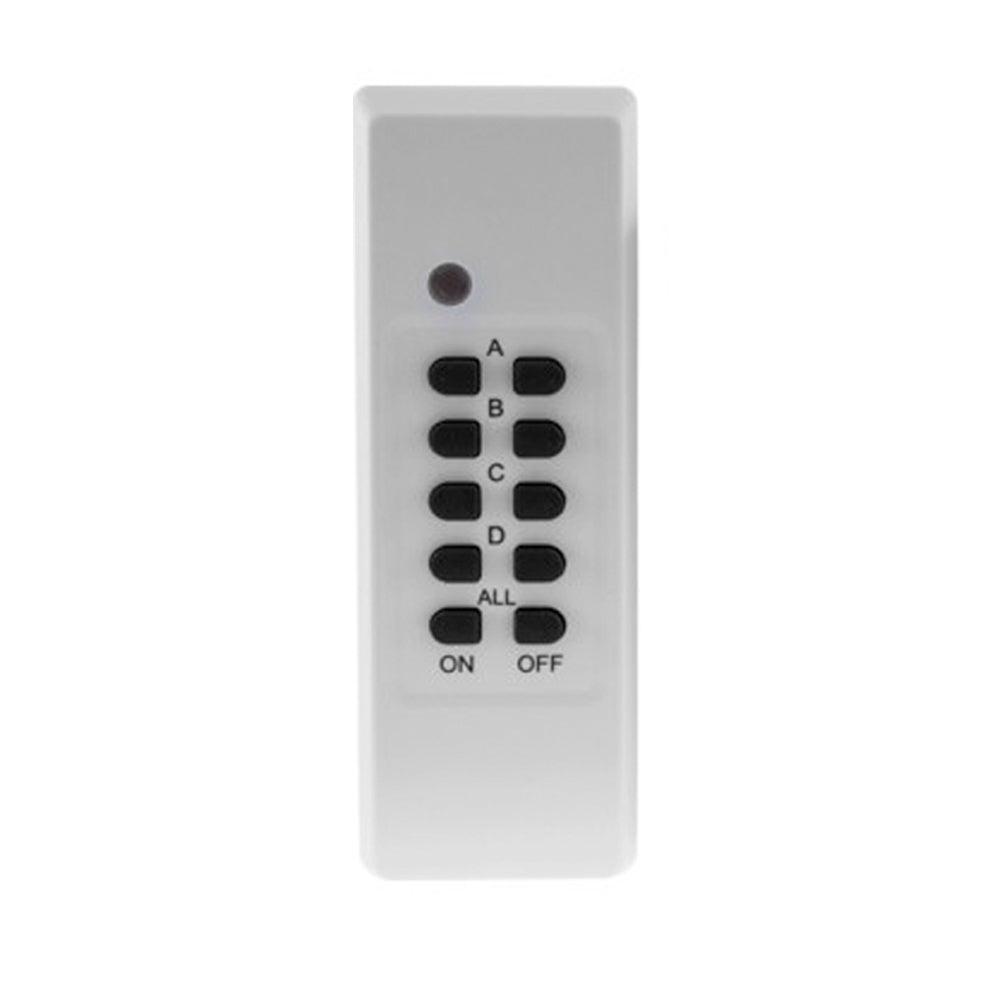
OFF: Button A Right
Tip: Confirm the camera is off using the Gate and Cams app on the kitchen tablet.
Foxtel
Video Streaming
Each TV is an LG smart TV with streaming apps available. Use the LG Content Store to install additional apps (not all apps may be available).
Important: You’re welcome to log into your own accounts, but please log out before you leave.
Streaming Music
The house has a WiiM multi-room audio system. Stream music using:
Playing to Multiple Rooms
To group speakers, use the WiiM app (on kitchen tablet, or install on your device – no login needed).

To group rooms, tap the  link icon next to any speaker.
Upstairs Living Room: Turn amplifier on and select CD input using the amplifier remote.
Pool Bar: These speakers are for TV audio only – no music streaming.