Link to this page
13 Tarakan St, Sorrento

🛡️ Santorini Blue now conforms to the Phillips Group Properties Security Protocols

⚠️ All security codes must be changed after each guest departure
This includes: Alarm PIN, Front Door Smart Lock, and External Key Safe

Bosch Solution 6000 Alarm Keypad
The property is protected by a monitored alarm system. Follow the instructions below to manage PIN codes.
💻 Remote PIN Changes: Can be done by Straight Forward Technology for a fee. Contact support for remote assistance.
⚠️ IMPORTANT: Semi-permanent PIN codes (cleaners, trades) should NEVER be given to guests. All PIN code activity is logged in the system for tracking who has accessed the property and when.
🔧 System Model: Bosch Solution 6000
🖥️ Remote Access: Straight Forward Technology has full remote access for master PINs, installer PINs, and system configuration
📞 Support: Contact Straight Forward Technology for technical support

The iFob Control app allows authorized users to control the alarm system from their phone.
📲 Features: Arm/disarm the alarm remotely, receive alerts if the alarm is triggered
🔐 Setup: Only Straight Forward Technology can set up new users. Contact them to request access.
👥 Property Mums Staff: May want this app on their phones for checking if the place is armed/disarmed, or to be alerted of any security concerns in the area.
User permissions can be configured for basic arm/disarm only or full alert notifications
The smart lock and key safe use the TTLock app. Straight Forward Technology and Property Mums have full remote access to change PIN codes.
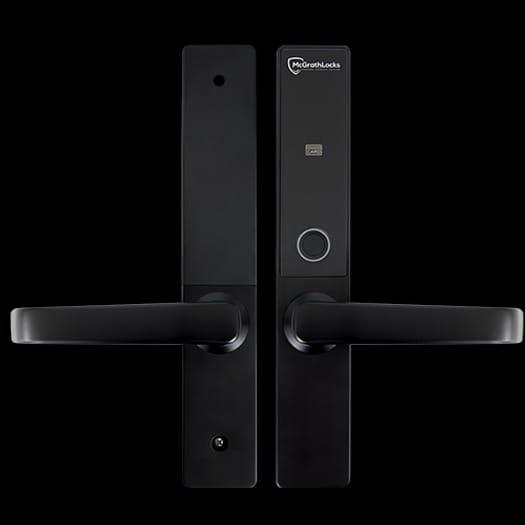
Front Door Smart Lock
For Guest Codes (Recommended – Timed):
✅ Timed codes are preferred as they automatically expire – no need to manually delete!
For Staff Codes (Permanent):
Alternative – Custom Codes:
For both guest and staff codes, you can also use Passcodes >> Generate Passcode >> Custom
⚠️ CRITICAL – NAMING REQUIREMENT:
All PIN codes in TTLock MUST be named properly (e.g., “Guest – Smith Family Jan 20-25” or “Cleaner – Sarah”). Unnamed or improperly named codes may be deleted as a security precaution!
⚠️ PIN CODE SECURITY: Semi-permanent PIN codes (cleaners, trades) should NEVER be given to guests. All PIN code activity is logged in the system for tracking who has accessed the property and when.
📱 App: TTLock (available on iOS and Android)
🔧 Remote Management: Straight Forward Technology and Property Mums
🔄 PIN Changes: All TTLock device PINs must be changed after each guest
🌐 Internet Connectivity: TTLock devices have a WiFi gateway connected to the internet that allows remote functions (PIN changes, remote unlock, activity logging, etc.)
Note: Without the gateway, remote PIN changes and monitoring are not possible
⚠️ CRITICAL SAFETY REQUIREMENT ⚠️
It is IMPERATIVE that backup physical keys are available to guests in an emergency.
DO NOT rely on electronics only like the front door smart lock.

External TTLock Key Safe
✅ RECOMMENDED: A copy of the front door key should be kept in this key safe. Since this is an external key safe, ensure guests know its location and have the access code before they arrive at the property.
🔐 External Key Safe: TTLock electronic key safe with app control and activity logging
📊 Access Logging: TTLock key safe logs all access attempts with timestamps
(Further security details and troubleshooting tips will be added here. – TBA)
📶 Wi-Fi Connection
Network Name: 13 Tarakan WiFi
Password: Forward1
📡 Coverage: UniFi network system with multiple access points providing comprehensive Wi-Fi coverage throughout the property
🛡️ Security: Network is properly secured with firewall and guest protocols
🌐 Current Connection: NBN FTTN (Fibre to the Node)
✅ Upgrade Available: FTTP (Fibre to the Premises) is now available. Straight Forward will be in touch regarding the upgrade.
📡 Wi-Fi System: UniFi network with multiple access points including “DS Lounge” and “US Somewhere” for full property coverage
⚡ Speed: Current NBN plan (upgradeable for larger groups if needed)
🛡️ Security: Network is properly secured with firewall and guest protocols
If experiencing internet issues, Straight Forward Technology can remotely reboot devices and diagnose problems.
📞 Support: Contact Property Mums who will coordinate with Straight Forward Technology if needed
(Further network details will be added here. – TBA)

