
Link to this page
12 Beach Rd, Shoreham

🛡️ Atlas Retreat now conforms to the Phillips Group Properties Security Protocols

⚠️ All security codes must be changed after each guest departure
This includes: Alarm PIN, Front Gate Keypad, Front Door Smart Lock, and Internal Key Safe

Solution 6000 Alarm Keypad
The property is protected by a monitored alarm system. Follow the instructions below to manage PIN codes.
💻 Remote PIN Changes: Can be done by Straight Forward Technology for a fee. Contact support for remote assistance.
⚠️ IMPORTANT: Semi-permanent PIN codes (cleaners, trades) should NEVER be given to guests. All PIN code activity is logged in the system for tracking who has accessed the property and when.
🔧 System Model: Solution 6000
🖥️ Remote Access: Straight Forward Technology has full remote access for master PINs, installer PINs, and system configuration
📞 Support: Contact Straight Forward Technology for technical support

The iFob Control app allows authorized users to control the alarm system from their phone.
📲 Features: Arm/disarm the alarm remotely, receive alerts if the alarm is triggered
🔐 Setup: Only Straight Forward Technology can set up new users. Contact them to request access.
👥 Property Mums Staff: May want this app on their phones for checking if the place is armed/disarmed, or to be alerted of any security concerns in the area.
User permissions can be configured for basic arm/disarm only or full alert notifications
The property features Dahua intercom systems at both the front gate and front door, managed through the DMSS app.
📱 Indoor Monitor: DMSS is running on the iPad mounted to the wall near the kitchen for easy access to answer the intercom and open the gate.
👥 Property Mums Staff: Contact Straight Forward Group to have DMSS set up on your phone for remote property management.
🔧 System: Dahua Video Intercom System
📱 App: DMSS (available on iOS and Android)
(Further technical intercom details to be added as needed.)
All smart locks and keypads use the TTLock app. Straight Forward Technology and Property Mums have full remote access to change PIN codes.
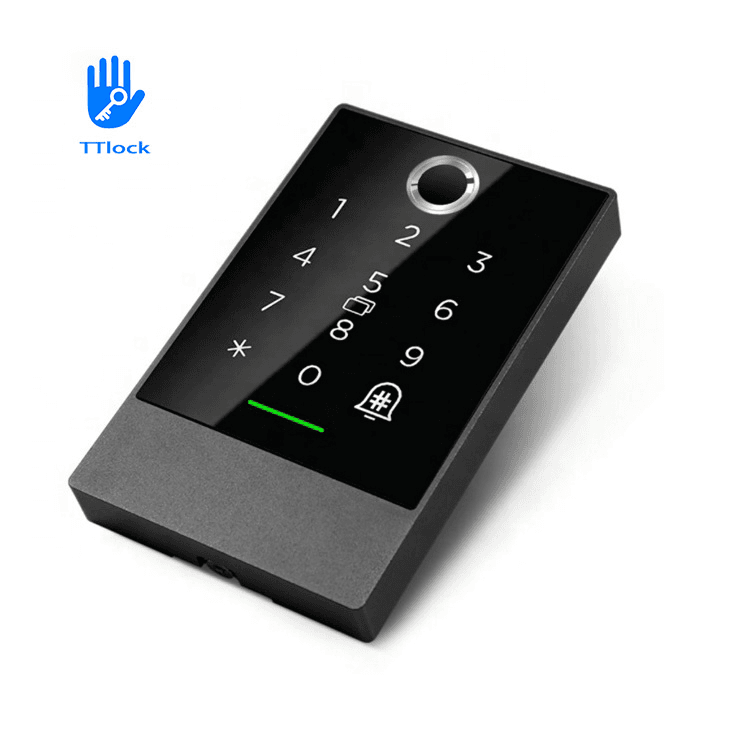
Front Gate Keypads
⚠️ PIN CODE SECURITY: Semi-permanent PIN codes (cleaners, trades) should NEVER be given to guests. All PIN code activity is logged in the system for tracking who has accessed the property and when.
📱 App: TTLock (available on iOS and Android)
🔧 Remote Management: Straight Forward Technology and Property Mums
🔄 PIN Changes: All TTLock device PINs must be changed after each guest
🌐 Internet Connectivity: Each TTLock device has a gateway connected to the internet that allows remote functions (PIN changes, remote unlock, activity logging, etc.)
📡 Gateway Locations:
• POE Gateway at front gate
• WiFi Gateway in bedroom nearest front door
Note: Without these gateways, remote PIN changes and monitoring are not possible
⚠️ CRITICAL SAFETY REQUIREMENT ⚠️
It is IMPERATIVE that backup physical keys are available to guests in an emergency.
DO NOT rely on electronics only like the front door smart lock.

Internal TTLock Key Safe
✅ RECOMMENDED: A copy of the front door key should be kept in this key safe. Guests should be instructed to take this key with them whenever they leave the property to ensure they can always get back in.
🔐 Internal Key Safe: TTLock electronic key safe with app control and activity logging
🔑 Emergency Key Safe: Traditional mechanical combination lock (non-electronic)
📊 Access Logging: TTLock key safe logs all access attempts with timestamps
(Further security details and troubleshooting tips will be added here. – TBA)
Atlas Retreat features high-speed fibre internet throughout the property.
Network Name: 12 Beach Road WiFi
Password: Atlas12!
📡 Coverage: 5 Wi-Fi access points provide full coverage throughout the property
⚡ Speed: 100Mbps fibre connection (upgradeable for larger groups if needed)
🛡️ Security: Network is properly secured with firewall and guest protocols
If experiencing internet issues, Straight Forward Technology can remotely reboot devices and diagnose problems.
📞 Support: Contact Property Mums who will coordinate with Straight Forward Technology if needed
🌐 Connection Type: Fibre to the Premises (FTTP) – installed May 2025
📍 Infrastructure Location: Behind multi-purpose room TV (NBN NTD and UniFi Gateway)
🏢 Network Hub: Main communications hub located upstairs
🔧 Equipment: UniFi network system with enterprise-grade management
📶 Access Points: 5 x UniFi Wi-Fi access points for comprehensive coverage
🏢 ISP: Straight Forward (Aussie Broadband reseller)
🖥️ Remote Access: SF has full remote management capabilities
✅ Reliability: FTTP provides much more reliable service than old copper connections
(Further internet and network details will be added here. – TBA)

